|
So you just discovered Broadband-Hamnet™ and may be wondering what is going on. Broadband-Hamnet™ is the self configuring ham network. It is time to have our own Broadband-Hamnet. Hams have transferred IP data by radio for ages. This network is FAST!
Lets start with some basic concepts. We will be expanding this page so check back from time to time.
- Broadband-Hamnet™ is a network, it is not application software. It is a special firmware build that transforms consumer wireless gear to a specialized ham radio function. It can use application software to transport your data from place to place, but you must provide the application software just like you do at your home or office.
- A Mesh network is a highway over which data travels. Turning on two mesh nodes loaded with our firmware creates a data network. This highway carries your cargo (data), and allows your local computer to use information or applications stored in other locations
- Mesh nodes were originally consumer wireless routers but changed function when the firmware was changed
- After conversion, the WAN, LAN and Wi-Fi ports are linked using special rules and no longer operate like a normal wireless router. Some devices like Ubiquiti Bullet have only a single network connection. Others like the WRT54x series have multiple LAN jacks and the .Internet jack. All have the RF (WiFi) antenna and signal.
- Mesh nodes are self discovering, self configuring, self advertising and fault tolerant
- Mesh nodes are a data network without the wires. Most tasks that you can do over a wired or wireless network at your home or office will work on a mesh node
- Mesh nodes are small, portable, low-power and inexpensive. They are easily battery powered
- Mesh nodes can easily have a range of 10 miles or more using stock power and gain antennas if you have true line of sight
- Mesh nodes communicate with other nodes over Wi-Fi frequencies and only talk to other mesh nodes on the wireless port
- You can't use Wi-Fi to connect to a mesh node from your computer, netbook, smart phone or other wireless device.
- It is possible to extend a mesh network with a properly restricted access point (AP) where only hams are given access
- Computers connect to mesh nodes with an Ethernet cable and control them using a web browser
- You can access the control screen on your own mesh node and easily jump to any other mesh node with a click or two
- The web address of your mesh node is http://localnode:8080
- From the mesh status screen, you can jump to any other member mesh node to use its services, configure it, install or update software or view the other direct neighbor nodes that can be seen by that mesh node
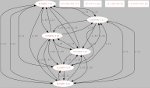
- Mesh nodes use peer to peer connections. This means each node connect to all others it can directly reach.
This is different than the star configuration where wireless users connect to an access point
- Peer to peer connections share the same SSID (network name) That name is BroadbandHamnet-v1
- If you change the SSID, spell it wrong or change the punctuation, the mesh is broken. It must be exactly the same for all nodes.
- As later versions of the firmware are developed, the need to change data formats may arise. At that time, the SSID will change, forming a new mesh network with the updated firmware.
- Do NOT change the SSID unless you are an expert and understand that you will be creating an entirely different mesh network when you do so
- Each mesh node must have a unique node name. Normally this is your callsign with a suffix (w1aw-1, w1aw-2, w1aw-mobile...)
- The SSID is the network name seen over Wi-Fi and is the same for all mesh members, the Node name is what you named the device (your callsign + suffix)
- Mesh nodes operate on channel 1. Channels 1-6 of the 802.11B/G wireless band are completely within the 2.4ghz ham band. As support for additional ham bands is developed, different channels will apply in that band.
- Mesh nodes on channels 1-6 use FCC part 97 rules instead of part 15. This allows big antennas, more power, other changes
- Mesh nodes talk to other nodes using RF (Wi-Fi), to the Internet over the WAN port and to computers, servers, video cameras and other devices using the LAN ports
- Mesh nodes will create a network just by turning several of them on. They create portable, high-speed data networks in minutes
- Mesh nodes don't need any computer to be attached to pass data to other mesh nodes. Just plug one in, it will expand the mesh
- You don't need to physically attach to a given mesh node to make changes to it. You may "remote in" to configure it from anywhere on the mesh network
- Data is data. It can be IP Video, VOIP, LAN traffic between computers, web browser reading an situation briefing web page, downloading operating software or a radio manual by FTP, printing out something on a remote printer, keyboard chat, hop to the Internet, etc
- IP addresses exist but you interact with mesh nodes by using the node name. The names can be tactical but your ham call is still sent out frequently as a beacon packet
- Any mesh node within wireless range automatically joins the existing mesh and exchanges available routes with all others
- If one mesh node has Internet access or contains a NTP (network time protocol) server, all mesh nodes will get a correct date/time in their display
- As signals grow stronger and fade, nodes join and leave the mesh. It can happen many times as you drive around
- Your path between any two mesh nodes may be single or multiple hop and can/will change with no notice or impact to you. The data flows where it needs to flow because of the automatic routing delivered by OLSR
- A single node joining your mesh may add many other nodes if it can see other mesh nodes the first group can't reach. It does so by becoming a bridge to join the two separate groups of mesh nodes.
- Mesh node owners from different parts of the country will join any existing mesh just by coming within range if it
- Using a standard software load, one shared SSID and one operating frequency on all nodes means that any two hams, never having met each other and unaware of the other's presence can form a mesh network just by being in range of each other. Later, additional hams join the network (and perhaps bring additional network resources or advertised services) by turning on their devices within range of the first group
- Doman Name Service (DNS) is automatically provided to all mesh members, allowing them to see/interact with other mesh nodes
- After initial conversion and setting the node name and password, no further changes are needed to connect with other nodes and no configuration or adjustments are needed for the mesh to continue to run. User may join or leave, advertised services can appear or be turned off, and all users take advantage of any network resource.
- Computer resources on your mesh node can be shared with others on the mesh. These are Advertised Services
- Your mesh node can see and use advertised services on other nodes by just clicking on them in your web browser
- If one mesh node has it's WAN port plugged into an Internet feed, and a config change, it can provide Internet to all mesh members but you are always responsible for all traffic remaining part 97 compliant.
- Firmware upgrades and patching are done from an internal menu (Internet or local copy of the firmware upgrade is required)
- Mesh nodes can be remotely managed and the firmware or patch level upgraded by any user with the password for that node
- Users on other parts of the mesh may view other mesh node status screens and even wireless devices visible to that specific node
- Mesh nodes have several modes of operation and the same device can be configured to change roles as you dictate
- Having spare mesh nodes means you can deploy them for each of several roles, such as putting up a local AP for served agencies
- Several mesh nodes + one experienced ham operator = a portable, quick deployment, swiss army knife of network services
- Microwaves are different than UHF/VHF/HF Antennas always get you more than amplifiers. When a repeater is all mouth and no ears it is called an "alligator". When you increase transmit power on a mesh node, you can't get the same help hearing the incoming signals. Directional antennas narrow the beamwidth to boost signals on axis while concurrently rejecting unwanted signals and noise off axis. No amplifier can do this.
- Any increase in power also causes serious safety concerns and raises the noise level for all users. The control operator is always responsible for compliance with FCC OET Bulletin 65 regarding RF exposure.
- Add quality directional antennas on both ends and ensure you have a true line of sight path with a clear Fresnel zone before considering any amplifier. See other sections on this web site for RF Safety and Noise Level information.
Several things are important as basic knowledge. Please read the General Disclaimer and the HSMM-MESH Design Philosophy for adequate background on how this firmware changes your previous wireless router.
We HIGHLY recommend (as in "Go get it right nowt") a copy of WNDW (Wireless Networking in the Developing World) a FREE e-book (PDF or HTML). You can read this to help understand concepts and technologies of wireless networking and how to set up your own mesh network. If we were to write a textbook about mesh networking and field operations, only a few chapters would be different than what is already published. **you need to read this book**
Which hardware can you use to make a mesh node
Converting an existing wireless router by loading our firmware
- See the PDF or Powerpoint presentation on how to install firmware
Operating your mesh node on the network
- This section under construction
Choosing antennas and connecting them
- This section under construction
|